What it does
The robot is the live side of the system: a ROS 2 sensor stack and the motor control chain
(12 GIM6010-8 CAN-bus motors), plus its own locomotion controller. CHAMP (gait + IK at 200 Hz) runs on
the robot: it picks up the velocity command from Limit Dash teleop or the Nav2 stack,
sends the motor commands out on the two CAN buses via its own CHAMP controller, and writes the live joint angles back
over the shared ROS domain. The sim side lives on the server, its CHAMP (Gazebo) topics use the sim_*
convention, so the live and sim topic spaces stay separate.
- Two complete Nav2 stacks both run on the server: the production stack
(standard Nav2 naming) and the sim stack (
sim_*//gazebo/*naming). The robot runs no Nav2 nodes; it publishes sensor data (see the Topics page). - Command intake from Limit Dash or another controller on the network.
- Motor control: the 12-joint leg chain (hip → upper → lower) is driven by CHAMP on the robot: velocity command in, GIM6010-8 CAN frames out (six joints per bus), live joint angles back.
- Live sensor stack published for subscribers: ZED 2i, Ouster OS0-128, and u-blox F9P GNSS.
- SSH: The Jetson is a computer on the network you can
sshinto directly for more information.
Wiring full system
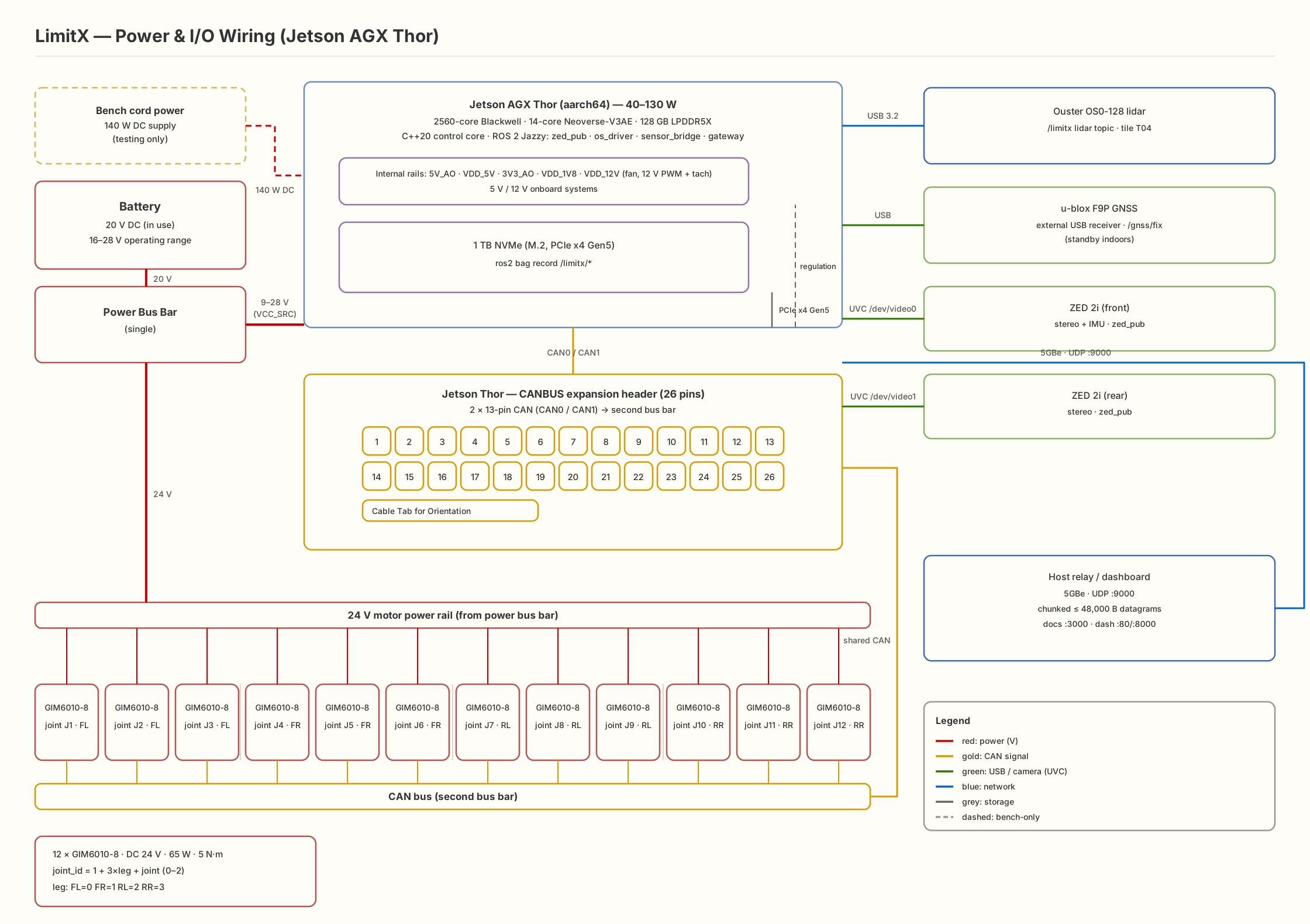
One diagram, everything plugged in: the Jetson AGX Thor at the center, twelve Steadywin GIM6010-8 motors split across two CAN buses, the sensor stack over USB, telemetry out over 5 GbE, and the bench power path dashed.
Drivetrain Steadywin
The robot moves on 12 × GIM6010-8 mini planetary gear motors from
Steadywin: three per leg × four legs, joint IDs J1–J12 per the
Robot Model ordering. Every joint is CAN-addressable and rides the 24 V bus.
| Parameter | Value |
|---|---|
| Vendor | Steadywin |
| Product | Mini Planetary Gear Motor: model GIM6010-8 |
| Rated voltage | DC 24 V (operating range 16–28 V) |
| Power | 65 W |
| Rated torque | 5 N·m |
| Pole pairs | 14 |
| Reduction | 8:1 planetary |
| Count | 12: three per leg × 4 legs (J1–J12) |
CAN bus configuration CAN0 · CAN1
The Jetson's two CAN controllers split the twelve motors, six joints per bus, over the two 13-pin headers on the Thor. The CAN protocol runs on its own bus bar, separate from power distribution (see Power).
| Item | CAN0 | CAN1 |
|---|---|---|
| Header | 2× 13-pin CAN headers on the Thor (CAN0 / CAN1) | |
| Joints | 6 of 12: joint→bus split per the wiring diagram | 6 of 12: joint→bus split per the wiring diagram |
| Bit rate | 1 Mbps (per Steadywin spec; can_bus.py) | |
| Termination | 120 Ω impedance-matching resistor onboard each driver, switchable (enable_r120): enabled at one bus end, disabled on the remaining motors | |
| Node IDs | J1–J12 in Robot Model joint ordering; each motor's node_id (bits 10–5 of the 11-bit CAN ID) set per motor at commissioning via Set_Axis_Node_ID (CMD 0x006) | |
| Protocol | Standard CAN: 11-bit ID = (node_id << 5) | cmd_id, 8-byte payload, little-endian IEEE 754; ODrive-compatible message set (Heartbeat 0x001, Stop 0x002, Set_Input_Pos 0x00C, …) | |
Motor configuration and CAN bus details are documented on the Canbus page; the locomotion contract and safety are on the Locomotion page.
Jetson AGX Thor: I/O control core
The Thor is the on-robot control core. This is what's available to plug the robot in with, and what the robot actually uses of it.
| Interface | On the Thor | Used for |
|---|---|---|
| CAN | 2× 13-pin headers (CAN0, CAN1) | 12 × Steadywin GIM6010-8: 6 joints per bus |
| USB | 2× USB-A 3.2 · 2× USB-C 3.1 · 1× USB-C debug | F9P GNSS · ZED 2i front (UVC) |
| Network | 5 GbE RJ45 + QSFP28 | Ouster OS0-128 (dedicated Ethernet) · the ROS DDS link to the server |
| Storage | 1 TB NVMe M.2, PCIe x4 Gen5 | robot-side nodes + bag storage |
| Display | HDMI + DisplayPort | bench monitoring |
| Debug | 2× JTAG | bring-up / debug |
| Power | VCC_SRC 9–28 V · 40–130 W envelope | main system power |
| Software | JetPack 7 · Linux 6.8 · Ubuntu 24.04 | ROS 2 Jazzy stack |
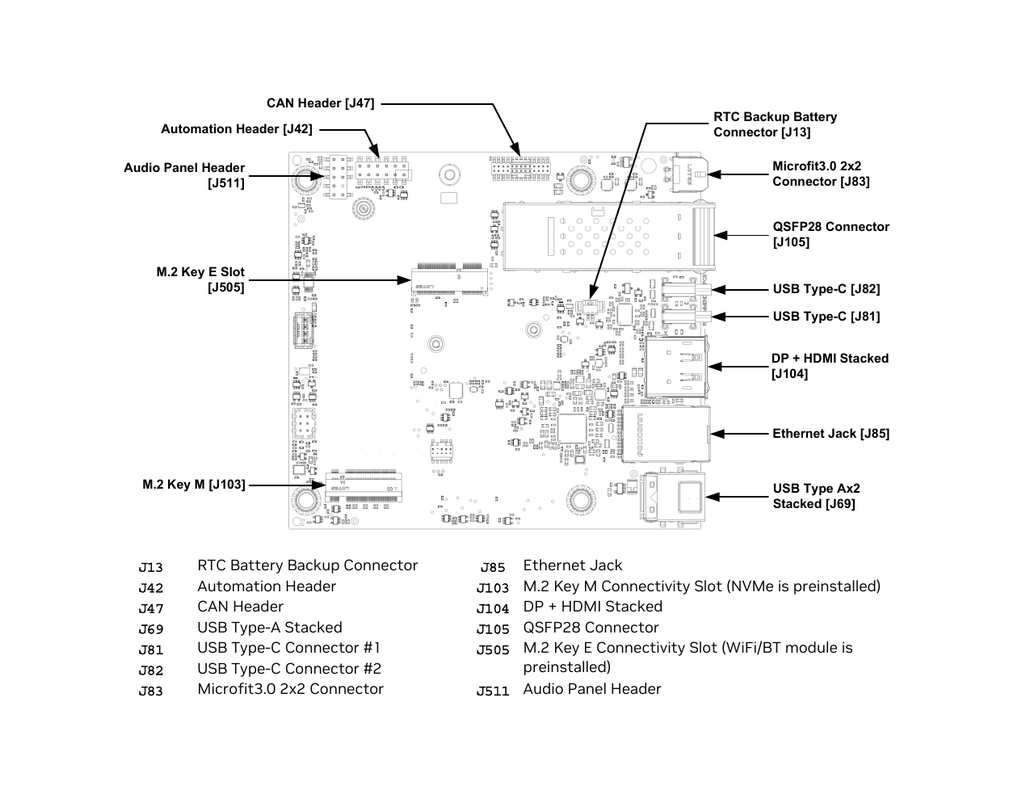
The two 13-pin CAN headers (1.27 mm pitch, J47) carry CAN0 and CAN1
(DOUT/DIN pairs on pins 3/5 and 7/9, via the board's TJA1042 transceivers) into the
CAN bus configuration above. The USB bank is dual Type-A 10 Gbps (J69) plus two
Type-C 5 Gbps (J81/J82), with a separate Type-C debug port (J90). That's where the
F9P GNSS and the ZED 2i front stereo sit. The 5 GbE RJ45 and QSFP28 cage (J105) carry the Ouster
OS0-128 and the ROS DDS link to the server. System power enters through the Microfit 3.0 connector
(J83, 9–28 V) or USB-C PD, feeding the 20 V bus.
Device connections what plugs where
| Device | Plugs into | Notes |
|---|---|---|
| 12× Steadywin GIM6010-8 | CAN0/CAN1 headers + power bus bar | three per leg, J1–J12; 24 V bus, 65 W rated each |
| Ouster OS0-128 | Ethernet (dedicated port) | point cloud via ouster_ros → /ouster/points (ROS 2 DDS) |
| F9P GNSS | USB | external receiver, publishes /fix (ROS 2 DDS) |
| ZED 2i (front) | USB (UVC) | /dev/video0–1 → /zed2i_front/zed_node/* (ROS 2 DDS) |
| Server (x86-64) | Ethernet (LAN) | ROS 2 DDS: sensor topics out, /cmd_vel teleop + Nav2 in |
| Battery / bench supply | VCC_SRC | 20 V battery during use; corded for bench testing |
Data direction: sensor topics flow robot → server over ROS 2 DDS (Jazzy on the robot, Lyrical on the server: DDS interop). Teleop and Nav2 commands flow server → robot as /cmd_vel. The only physical inputs to the motors are the two CAN buses and the power bus bar, see the wiring diagram.
Power 20 V bus
- Battery power of 20 V during usage; cord power for testing.
- Two separate bus bars: one for power distribution, one for the CAN bus protocol.
- Internal systems draw 5 V and 12 V rails.
Terminal interaction ROS 2 · raw CAN
Two levels. The normal path is ROS 2 on the Jetson: JointTarget in,
JointSample out at 50 Hz, PD control with pos/vel/max_tq
and kp/kd. The raw path is plain CAN frames on the shell: bench debugging, and the
only place the wire-level e-stop lives.
ROS 2: find and read the joint topics
ros2 topic list | grep -i joint
ros2 topic hz <sample topic>         # expect 50 Hz
ros2 topic echo <sample topic> --once
ros2 bag record /ouster/points /zed2i_front/zed_node/odom  # session recording
Raw CAN: watch and transmit frames
# watch everything on each bus
candump can0
candump can1

# e-stop: /safety/e_stop service → ODrive Stop (0x002) to all axes (see Locomotion Safety Contract)
cansend can0 0x022#  # node 0x01: (0x01 << 5) | 0x002, repeat for all 12 node IDs
/safety/e_stop is the application-level e-stop service; it triggers ODrive Stop (0x002) on all axes. See the Locomotion page for the full safety contract. At the driver level the GIM6010-8's native emergency stop is the ODrive Stop command (CMD 0x002, no data bytes), sent as the 11-bit ID (node_id << 5) | 0x002, e.g. 0x022 for node 0x01, which stops the motor and raises the ESTOP_REQUESTED exception. Joint commands in the software stack flow through the JointTarget contract on the Robot Model page; the Drive page exposes the same PD fields as live panel controls.
Kinematics 12 joints
The reference joint ordering, joint_id → leg/joint map, and full model description live on the Robot Model page: use it as the reference for all downstream consumers.
Each leg is a three-joint chain (hip → upper → lower), solved with standard rotation matrices per joint, applied to every leg. Foot rest positions in the body frame (mm):
| Foot | x | y | z |
|---|---|---|---|
| Left Front | 130 | −105 | −185 |
| Right Front | 130 | +105 | −185 |
| Left Rear | 240 | −105 | −185 |
| Right Rear | 240 | +105 | −185 |
Limit Dash
The Limit Dash is a production operations console: ZED 2i panels, LiDAR map, telemetry, and teleop. It is served by nginx in the limit-dash Docker container (host networking, no port mappings). The WebSocket bridge (ros_bridge.py) connects to the ROS 2 stack and streams sensor data to the browser in real time.
| Role | Container | HTTP | WS | ROS domain |
|---|---|---|---|---|
| Production | limit-dash | 8080 | 8000 | 0 |
Standard start
docker run -d --name limit-dash --network host --restart unless-stopped \
  -e ROS_DOMAIN_ID=0 -e ROS_AUTOMATIC_DISCOVERY_RANGE=SUBNET \
  production-limit-dash-docker:latest
The Drive page reuses this same dash UI on a recorded live session, so every control you see there is the production control. The console above is the live version of it.